> ## Documentation Index
> Fetch the complete documentation index at: https://auth0.com/llms.txt
> Use this file to discover all available pages before exploring further.
> Authorize machine-to-machine clients on behalf of an Auth0 Organization to issue access tokens scoped to that organization for backend API calls.
# Machine-to-Machine (M2M) Access for Organizations
This feature is available for B2B Professional, Enterprise, and Enterprise premium plans. To learn more, read [Pricing](https://auth0.com/pricing).
The [Client Credentials Flow](/docs/get-started/authentication-and-authorization-flow/client-credentials-flow) is used by an application to obtain access tokens for itself rather than for a user. This is useful in machine-to-machine use cases such as bots, CLIs, backend or daemon processes, or any application that consumes APIs on its own behalf. While end users are not involved, the Client Credentials Flow should still be scoped per organization to ensure that only allowed applications can access each organization’s data.
To scope each request to a given organization, include the corresponding `org_id` claim to machine-to-machine tokens. API servers must consider and enforce this claim when authorizing access to API resources and data. To learn more, read [Work with Tokens and Organizations](/docs/manage-users/organizations/using-tokens).
Machine-to-Machine Access for Organizations enables you to define the organizations that a given application can access for each API using the Client Credentials Flow. To learn more, read the following:
| **Read...** | **To learn...** |
| ---------------------------------------------------------------------------------------------------------------------------------------------------------- | ------------------------------------------------------------------------------------------------- |
| [Configure Your Application For M2M Access](/docs/manage-users/organizations/organizations-for-m2m-applications/configure-your-application-for-m2m-access) | General application settings to control M2M access to Organizations for each API in your tenant. |
| [Configure M2M Access with Auth0 Organizations](/docs/manage-users/organizations/organizations-for-m2m-applications/manage-m2m-access) | How to authorize, revoke, and audit M2M access for applications and organizations in your tenant. |
Let’s consider our fictitious [Travel0 company](/docs/manage-users/organizations/organizations-overview#sample-scenario) to show two relevant example use cases.
## Open up APIs to third-party applications
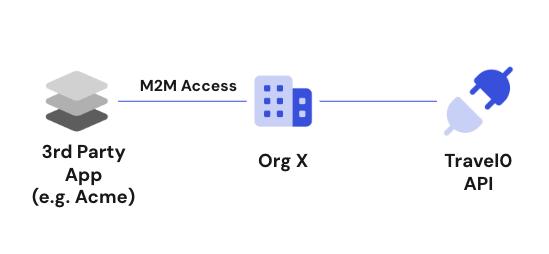
Using Auth0 Organizations and the Management API, Travel0 offers a self-service portal where customers can create and manage their own organization. Travel0 wants to make it easy for customers to build bots to help end users find and purchase adventures. Therefore, as part of this portal, Travel0 allows customers to register their applications (e.g. the bots) to consume the Travel0 API on their own behalf using machine-to-machine access. In this use case, cross-organization access must be correctly controlled so that applications belonging to one organization can only access that organization’s data via the Travel0 API.
For [third-party applications](/docs/get-started/applications/third-party-applications), `allow_any_organization` is not available. Each Organization must be explicitly authorized through an `organization_client_grant`. To learn more, read [Configure Machine-to-Machine Access](/docs/manage-users/organizations/organizations-for-m2m-applications/manage-m2m-access#authorize-m2m-access).
Machine-to-Machine Access for Organizations allows you to configure Client Credentials access for each API by associating it with a specific organization. In the following diagram, the applications of our example organization, org\_X, can only access the Travel0 API within the scope of org\_X. You can also configure access from a single application to several organizations in cases where aggregators are used. With M2M Access for Organizations, you control which applications can access a specific organization using machine-to-machine access on a per API basis.
 ## Isolation of organizations for internal applications
Travel0 also has some internal processes and CLI tools that need to access the Travel0 API using the Client Credentials Flow. To apply a unified access control strategy on the API, Travel0 wants requests from its own applications to be scoped to a specific organization to ensure only the right data is accessed in each case.
## Isolation of organizations for internal applications
Travel0 also has some internal processes and CLI tools that need to access the Travel0 API using the Client Credentials Flow. To apply a unified access control strategy on the API, Travel0 wants requests from its own applications to be scoped to a specific organization to ensure only the right data is accessed in each case.
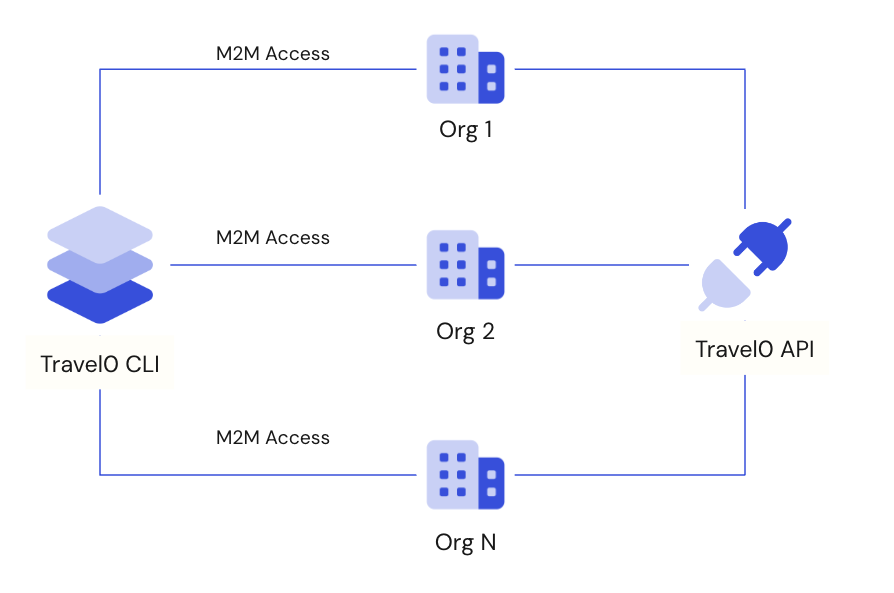 Machine-to-Machine Access for Organizations enables you to configure an application to access any organization for each API in your tenant using the Client Credentials Flow.